Construction drawing review
Mark up construction PDFs so every comment stays tied to the sheet.
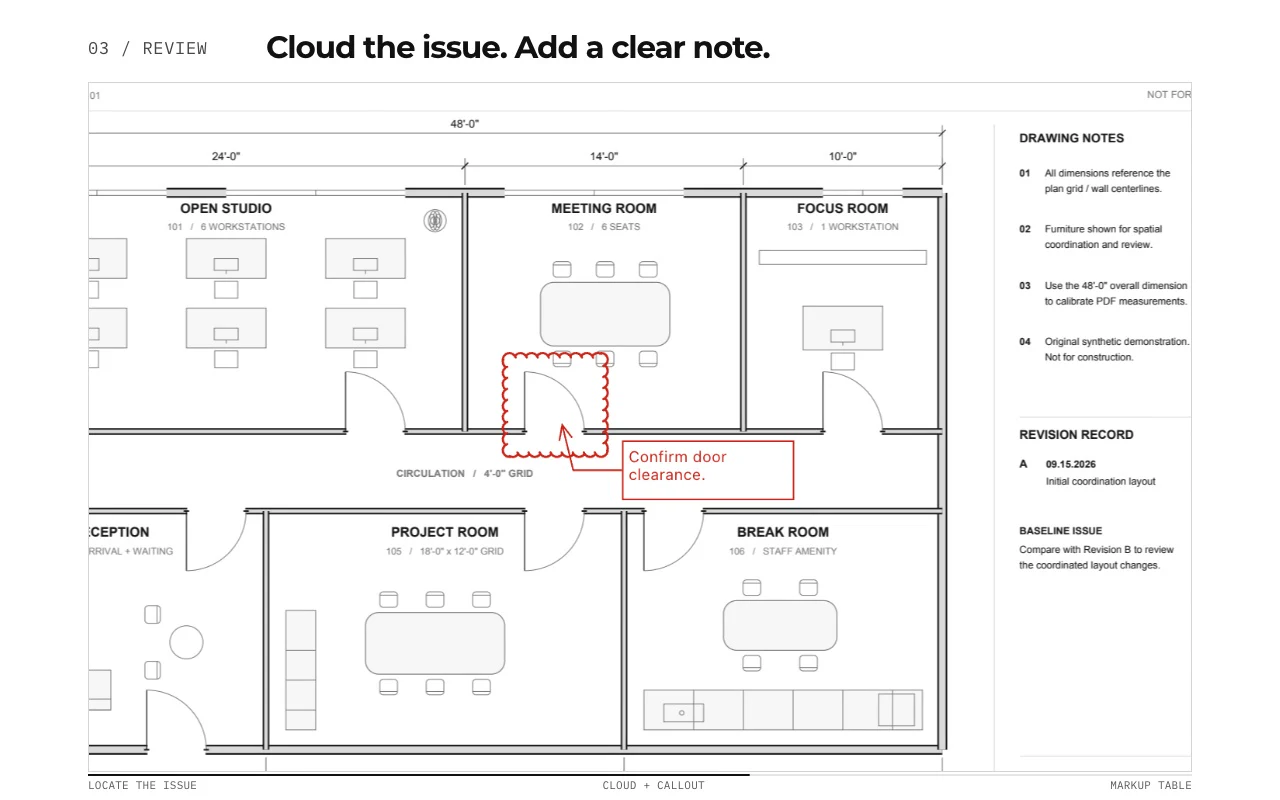
Add callouts, text, highlights, shapes, interactive review stamps, and revision clouds directly to plan sets, then use the Markup Table to track what has been flagged.
A local desktop workflow for design review, RFIs, field observations, punch notes, and drawing handoff on Mac or Windows.
Free with no trial timer: markup, review, calibration, 3 hand-created measurements per document, and Revision Package viewing. Symbol Search, plugins, and Revision Package changes or publishing require Pro.
Quick answer
How do you make construction PDF markups useful to the next reviewer?
Anchor each markup to the correct sheet and revision, describe the issue, and identify the action or clarification needed. PolyPDF supports notes, callouts, shapes, highlights, and revision clouds. Save and reopen a representative file, then test it in the recipient’s viewer before standardizing the handoff. The supplied review sample demonstrates a specific saved output, not universal viewer compatibility.
Check the review handoff and saved sample →01 / WHY
A useful markup should survive the handoff.
Construction comments lose value when the recipient cannot tell which part of the drawing they describe. PolyPDF keeps each annotation on the page and lists it in the sidebar, so reviewers can scan the record and jump back to the visual context.
Work with the construction drawing set
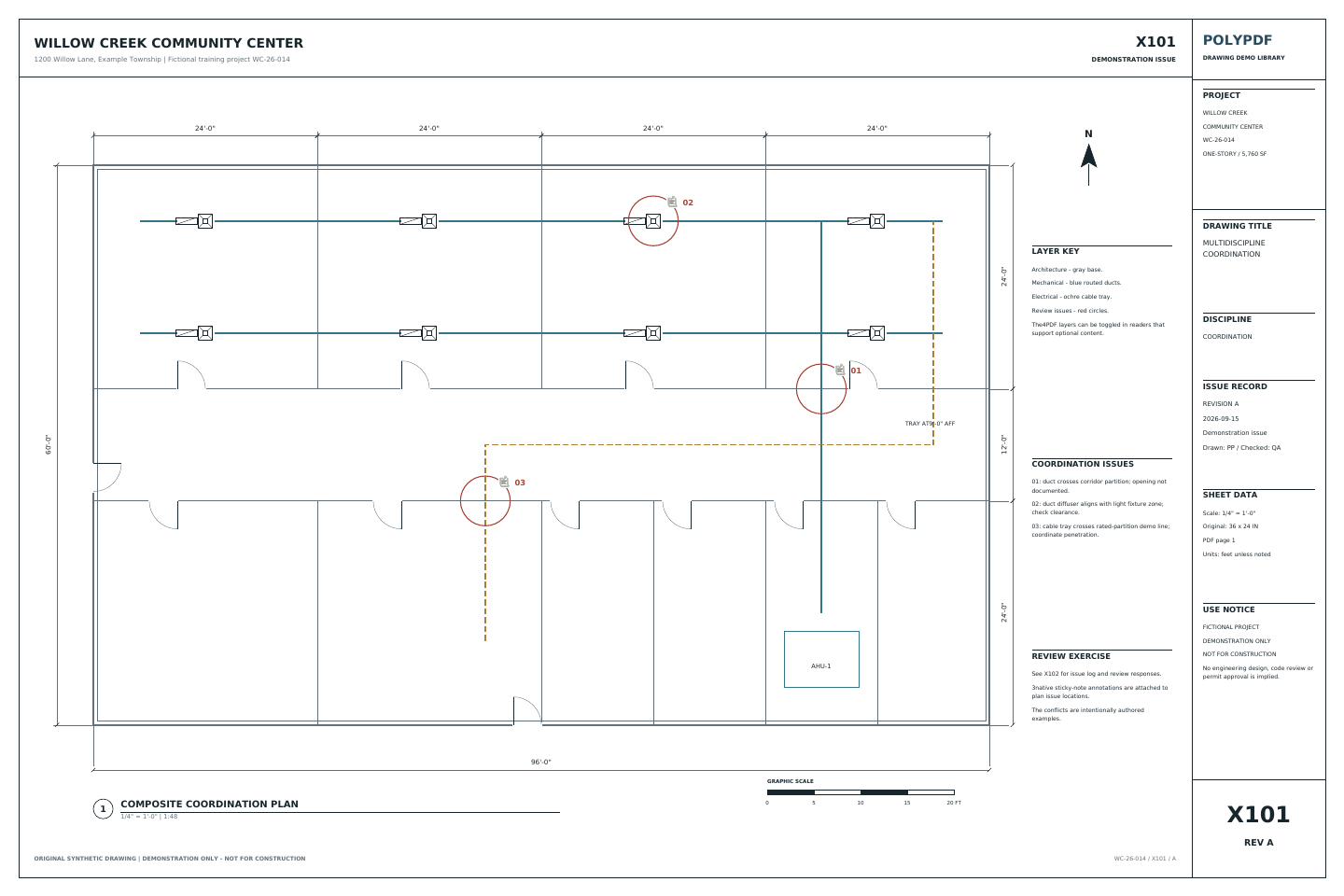
Review the Willow Creek coordination sheets
X101 · X102
- Open X101 and inspect the three numbered coordination issues and their existing sticky notes.
- Use X102 to match each location to its issue, trade, status, and requested response. Add your own review markup on a copy.
- Save the copy, reopen it, and inspect the annotations and any exported Markup Table before handing it off.
The source contains three authored issues and four PDF layers. These are fictional coordination exercises; no engineering or code-compliance conclusion is established.
Drawing reference values, not new app test results. Work on a copy and check your own saved output.
 Download the example drawing · PDF
Choose the edition for your review
Free markup or Pro: which fits your review?
PolyPDF Free includes markup, review, scale calibration, and up to 3 hand-created measurements per document, with no trial timer. Add notes and review a drawing before deciding whether you need Pro.
Choose Pro for unlimited measurements, PDF content editing, reusable toolset placement, Symbol Search, or creating and publishing Revision Packages. Adding a review note and editing the underlying PDF content are different tasks.
- Personal Pro license
- $74.95 USD, one payment. No subscription. Applicable taxes are shown at checkout.
- Computers and updates
- Use PolyPDF 1.x forever on up to 3 Mac or Windows computers. Every PolyPDF 1.x update is included. Future major versions may be optional paid upgrades.
- Direct website purchases
- 14-day money-back guarantee. Refund policy.
Review Pro pricing and purchase →
A personal license's computer allowance is not a team seat allocation. Review licensing for organization-managed seats.
| Your workflow | Free | Pro |
|---|---|---|
| Markup, review & scale calibration | Included | Included |
| Hand-created measurements | 3 per document | Unlimited |
| PDF content editing & colored overlays | Pro required | Included |
| Preset & custom toolsets | Browse presets | Place and use tools |
| Symbol Search & installed plugins | Pro required | Included |
| Revision Packages | View and navigate | Create, update and publish |
Your existing drawings and markups stay in place when you activate Pro.
Test the review handoff
Send a drawing the next reviewer can act on.
- Identify the source. Confirm the sheet number and revision. Save a separate review copy so the issued drawing remains identifiable.
- Make each issue actionable. Place a note or callout at the relevant location. Give its Markup Table row a specific Subject, record the question in Comments, and choose the agreed review Status.
- Choose the register scope. Clear filters when you need a full register. For a focused review, record the active filters. Check the exported CSV rows or PDF summary counts against the intended scope before sending.
- Reopen and check. Inspect the saved PDF and exported register together. Check page locations, readable notes, and issue counts in the recipient's workflow before issuing the files.
Use the marked PDF and register as attachments to your existing project process. Formal RFI numbering, routing, responses, and contractual due dates stay in that process. A markup status does not by itself establish design approval.
Inspect a saved review before downloading the app.
Open both files. Find the rectangle and text note in the saved review, then inspect them in the PDF viewer your recipient uses. No account or email is required.
This synthetic practice drawing was saved and reopened in PolyPDF 1.6.6 build 38 on Mac. It verifies one rectangle and one text note. It does not verify the register-export steps above, current-release or Windows behavior, or every recipient viewer.
See all samples and verification details →02 / WORKFLOW
From source PDF to a result you can review.
- 01
Open the issued drawing set
Review the same PDF sheets your team already distributes instead of converting the project into another proprietary format.
- 02
Place the comment where it belongs
Use a leader callout for a specific condition, a revision cloud for an affected region, or text, shapes, highlights, and stamps for the rest.
- 03
Check the Markup Table
Use the table to see annotations together and reduce the chance that a note disappears in a visually dense plan.
- 04
Save or export the reviewed PDF
Create a marked drawing that can be sent through the project’s existing document-control process.
03 / FIT
Review tools built around the drawing, not a chat thread.
- Callouts connect a readable note to an exact point on the sheet.
- Revision clouds make changed or questioned regions visible at a glance.
- Highlights keep underlying text and linework visible; filled annotations can become highlight shapes from the style toolbar.
- Text sizing can be adjusted for on-screen and printed readability.
- The Markup Table keeps annotations discoverable across a busy page.
- Measurement tools remain available when a review question also needs a quantity.
Start with the free app. Pay once to unlock every Pro workflow.
Use PolyPDF 1.x forever on up to 3 Mac or Windows computers. Every PolyPDF 1.x update is included. Future major versions may be optional paid upgrades.
14-day money-back guarantee. Try PolyPDF on your own drawings, risk-free.
04 / FAQ
Questions before you test it.
Is construction PDF markup free in PolyPDF?
Yes. PolyPDF Free includes markup, review, and scale calibration with no trial timer. You can create up to 3 hand-created measurements per document. Pro adds unlimited measurements, PDF content editing, toolset placement, Symbol Search, and other advanced workflows.
What should I send with a reviewed construction PDF?
Send the marked PDF with its sheet and revision identified, plus the register needed by the receiving process. Clear filters for a full register, or document the filtered scope for a focused review. Reopen the files and reconcile their issue counts before distribution.
What construction markups does PolyPDF support?
The current app includes text, callouts, highlights, shapes, freehand drawing, stamps, revision clouds, and measurement annotations. In 1.5.1 you can build interactive stamps on a blank canvas, prompt for placement values, and optionally save the template to a toolset.
Can I use PolyPDF for RFIs or punch notes?
You can place RFI and punch-related comments directly on the relevant sheet and save the marked PDF. PolyPDF is the drawing workspace; your project’s formal routing and approval process can remain unchanged.
Can recipients read the marked PDF without PolyPDF?
PolyPDF can save and export PDF output for normal document handoff. As with any PDF workflow, verify the exported file in the recipient’s viewer when interoperability is critical.