Revision Packages · introduced in PolyPDF 1.5
Carry review work forward when the next drawing issue arrives.
Import a new issue, reconcile every sheet, carry reviewed work forward, inspect changes and quantity impact, review references, and publish one current package with a revision report.
Revision Packages are portable project files for controlled drawing updates. Original PDFs remain unchanged; PolyPDF preserves verified source copies inside the package workflow.
Free with no trial timer: markup, review, calibration, 3 hand-created measurements per document, and Revision Package viewing. Symbol Search, plugins, and Revision Package changes or publishing require Pro.
01 / WHY
A new issue should not erase the work already invested in the old one.
A visual comparison can show that two pages differ, but an issue-wide update also has to identify each sheet, decide what replaces what, carry forward approved review work, resolve references, and publish an auditable current set. Revision Packages keep those decisions in one portable project instead of scattering them across filenames and hand-maintained notes.
02 / WORKFLOW
From source PDF to a result you can review.
- 01
Import the new issue
Choose the revised PDF files or folder and record the issue label, date, and whether it is a partial update or a full reissue. PolyPDF preserves verified source copies; it does not rewrite the originals.
- 02
Recognize and reconcile sheets
Review proposed sheet identities and replacement targets. You—not a revision code—decide which sheets replace, add, match manually, skip, or retire.
- 03
Carry review work forward
For reviewed replacements, bring forward markups, page scales, Spaces, and manual links, then confirm alignment where the old and new sheet geometry differs.
- 04
Review changes, quantities, and references
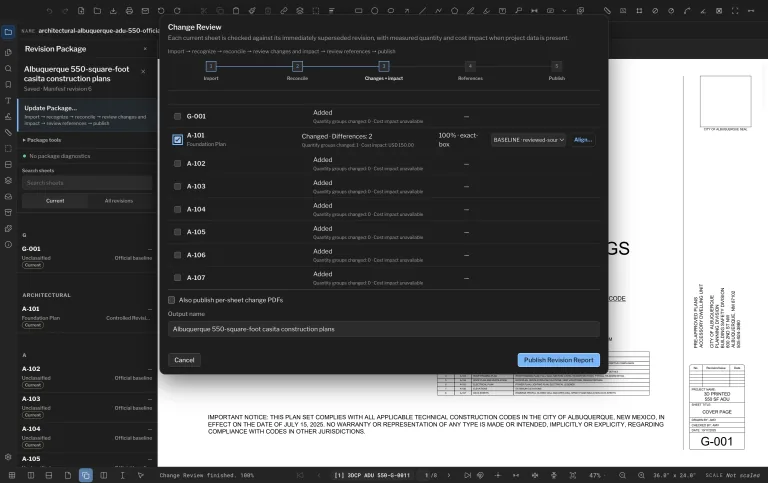
Inspect each current sheet against its superseded revision, review detected differences and available quantity or cost impact, and verify references before publication.
- 05
Publish the current package
Create the current drawing package and revision report from the same reviewed state, with optional per-sheet change PDFs when the review requires them.
03 / FIT
One reviewed path from incoming issue to current drawing package.
- Keeps source files, revision history, sheet links, and publication records together in a portable .polyset project.
- Supports partial updates and full reissues without treating revision codes as automatic approval.
- Carries forward reviewed markups, scales, Spaces, and manual links only when you approve the replacement.
- Surfaces drawing changes alongside measured quantity and priced-estimate impact when that project data exists.
- Publishes a current package and revision report from one reviewed revision state.
Start with the free app. Pay once to unlock every Pro workflow.
Use PolyPDF 1.x forever on up to 3 Mac or Windows computers. Every PolyPDF 1.x update is included. Future major versions may be optional paid upgrades.
14-day money-back guarantee. Try PolyPDF on your own drawings, risk-free.
04 / FAQ
Questions before you test it.
What is a Revision Package?
It is a portable PolyPDF project that keeps drawing sources, sheet identities, revision history, carried review work, reference decisions, and publication records together across drawing issues.
Does PolyPDF change my original PDFs?
No. The workflow preserves verified source copies and leaves the original PDFs unchanged. Published outputs are created separately from the reviewed package state.
Which Revision Package actions require Pro?
Free users can open, view, and navigate a Revision Package. Creating or changing package state, importing updates, reconciling sheets, and publishing require PolyPDF Pro.
How is this different from Compare Documents?
Compare Documents is a focused two-PDF visual comparison. Revision Packages coordinate an issue-wide process: sheet identity, replacement decisions, reviewed carryover, change and impact review, references, and publication.
Can recipients use the published PDFs without PolyPDF?
Yes. The published current package and revision report are normal PDF outputs. The .polyset project is the portable PolyPDF record used to continue the revision workflow.