Measure drawings on macOS
Measure a PDF on Mac without redrawing it in CAD.
Open the plan, set its scale, and pull real distances, areas, perimeters, angles, radii, diameters, and counts directly from the PDF in a desktop app for macOS.
Start with the free Mac download and validate scale accuracy on a drawing you already know. Upgrade only when you need more than 3 hand-created measurements in a document.
Free with no trial timer: markup, review, calibration, 3 hand-created measurements per document, and Revision Package viewing. Symbol Search, plugins, and Revision Package changes or publishing require Pro.
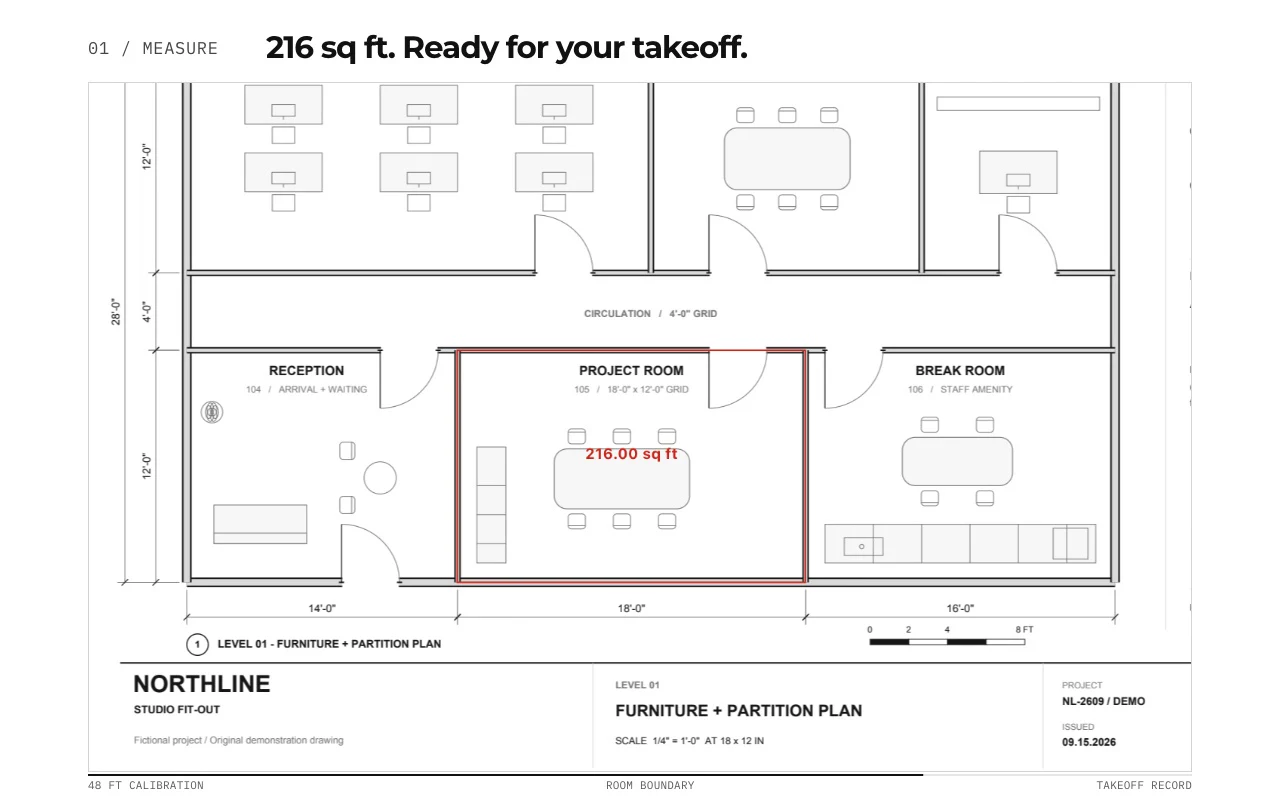
Quick answer
Can you measure construction PDFs on a Mac?
Yes. PolyPDF is a desktop PDF measuring app for macOS 14 or newer, on Apple silicon and Intel Macs. Open the drawing, calibrate a known dimension, verify a second span, and then measure lengths or areas. The Free edition supports up to 3 hand-created measurements per document. Use the reviewed worksheet quantities for the next estimating step.
Try the Mac measurement sample →01 / WHY
The scale is what turns pixels into useful dimensions.
A PDF viewer can show a drawing, but the measurement only becomes meaningful after the page is calibrated. PolyPDF lets you use a printed scale preset or define a known distance, then applies that calibration to the measurements you place on the sheet.
Work with the construction drawing set
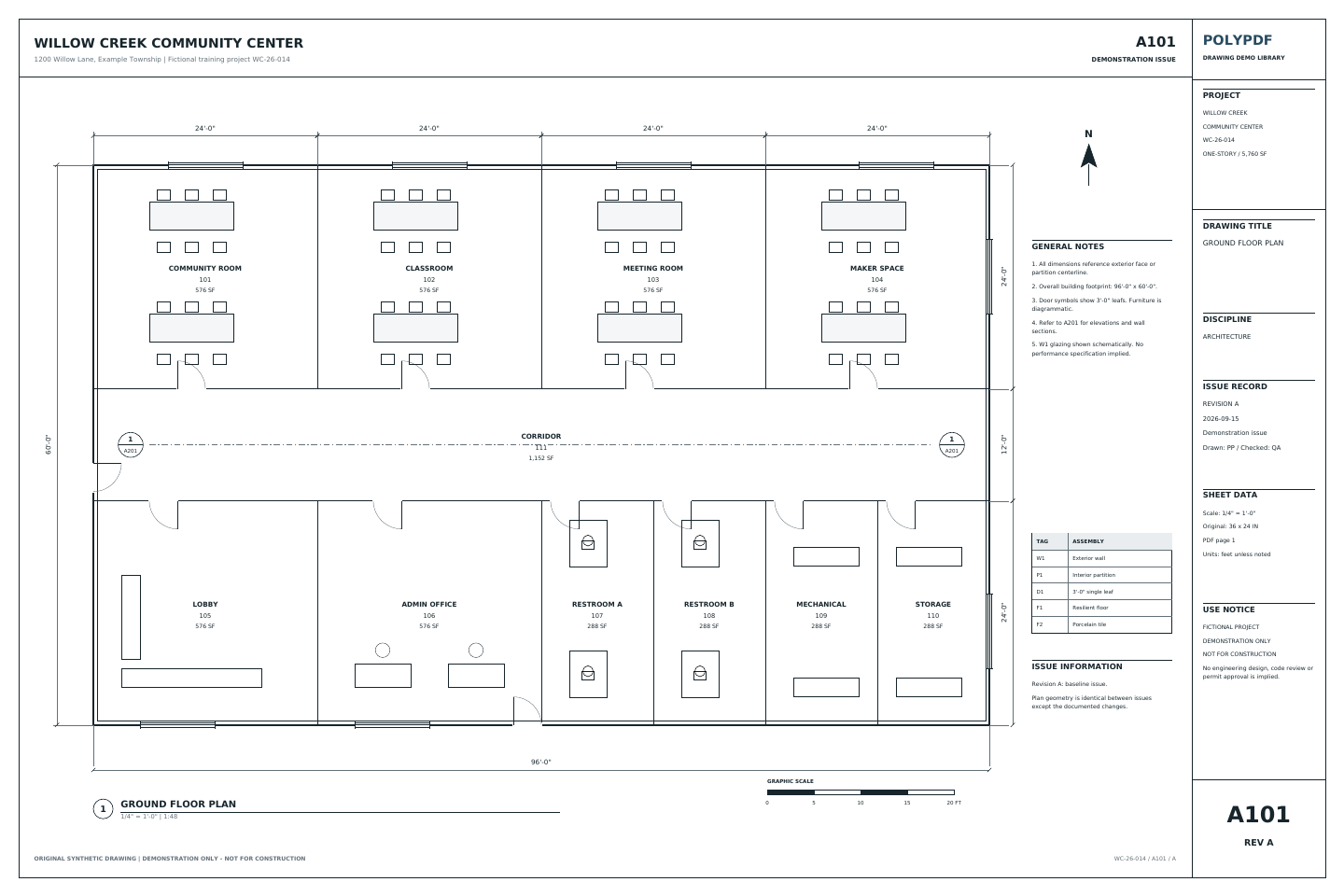
Measure the Willow Creek architectural plan
A101 · A201
- Open A101, Revision A. Calibrate the printed 20 ft reference; it spans 360 PDF points.
- Check the independent 96 ft width and 60 ft depth, then trace the outside building boundary.
- Compare the gross area with 5,760 sq ft. Keep sheet, revision, subject, unit, and total with the exported record.
This is a gross footprint exercise. It does not measure net flooring or subtract walls. The two length checks and one area use three manual measurements.
Drawing reference values, not new app test results. Work on a copy and check your own saved output.
Inspect the saved Mac example and its tested local build →
Move checked quantities into the free Excel takeoff template →
 Download Revision A · PDF
Page size and drawing scale
Can Preview measure a scaled PDF plan?
Preview can show the dimensions of a PDF selection in its Crop inspector. Those page dimensions need a drawing scale to become real-world lengths. For example, a 3-inch line represents 12 ft only when the PDF is correctly scaled at 1/4 inch = 1 ft.
For room areas and a quantity worksheet, calibrate the drawing in PolyPDF, check an independent known span, and trace the required boundaries. Do not infer a drawing scale from screen zoom, paper size, or a title-block label alone.
Apple’s guide to Preview’s Inspector · Calibrate a PDF drawing
Check a second reference before measuring.
A resized PDF can disagree with its printed scale. A stretched scan can disagree in one direction even after calibration. Check a separate known horizontal span and a known vertical span when distortion is possible; check each page or differently scaled detail separately.
Check horizontal and vertical reference measurements →
The website checker compares values you enter. It does not measure a PDF or certify the accuracy of an entire drawing.
Evaluate before buying
Measure a room on your Mac before buying.
Use the synthetic flooring drawing to test a small workflow within the Free limit. Its two net room areas total 408 sq ft. This is a practice drawing, not a construction document.
- Calibrate and check. Open the practice PDF and calibrate using a printed dimension. Use your first measurement to check a different known span. Stop and resolve any mismatch before taking off quantities.
- Measure the two net areas. Trace Room 1 around its edge-connected exclusion: 240 − 12 = 228 sq ft. Trace Room 2: 180 sq ft. With the check measurement, that uses three hand-created measurements.
- Review, export, and reopen. Check the two area rows total 408 sq ft. Keep the length check separate from the area total. Export the worksheet, save a separate PDF copy, and reopen it to inspect your measurements.
Free has no trial timer and allows up to 3 hand-created measurements per document. Choose Pro when a drawing needs more measurements or you need another Pro workflow.
Free with no trial timer: markup, review, calibration, 3 hand-created measurements per document, and Revision Package viewing. Symbol Search, plugins, and Revision Package changes or publishing require Pro.
Review Pro pricing and license terms →
Personal Pro: $74.95 USD, one payment. Use PolyPDF 1.x forever on up to 3 Mac or Windows computers. Every PolyPDF 1.x update is included. Future major versions may be optional paid upgrades.
Start with the drawing. Check the outputs.
- Download the flooring practice drawing · PDF
- Reference calculations · PDF
- Saved Mac measurements · PDF
- Mac worksheet export · CSV
No account or email is required for these files.
The practice drawings were redrawn on October 17, 2026 with walls, doors, dimensions, legends, and title blocks. The measured examples retain the original scale, geometry, and Mac-created annotations on the updated backgrounds. They are republished derivatives, not new desktop exports. The worksheet CSV and PDF totals come from the original October 16 test.
The 408 sq ft area result was exported and reopened in PolyPDF 1.6.6 build 38 on Mac. These files verify those two area measurements; they do not establish current-release or Windows parity. The three-measurement sequence above is an evaluation guide, not a separately verified app test.
02 / WORKFLOW
From source PDF to a result you can review.
- 01
Open the PDF on your Mac
Launch PolyPDF from Applications and open the plan set from Finder or from inside the app.
- 02
Set or verify the scale
Select the sheet’s architectural or engineering scale, or calibrate against a dimension printed on the drawing.
- 03
Choose the quantity you need
Use distance for runs, area for finishes, perimeter for boundaries, angle for geometry, or count for repeated items.
- 04
Read and export the result
Keep the value on the drawing, review it in the worksheet, and export when the result needs to move into another process.
03 / FIT
A direct Mac workflow for everyday drawing questions.
- Measures from the PDF without uploading the drawing to a browser service.
- Supports common architectural and engineering scales plus custom calibration.
- Shows measurement labels directly on the sheet for visual verification.
- Keeps related quantities organized in the Measurements panel.
- Lets you evaluate calibration and up to 3 hand-created measurements per document in the free download.
Start with the free app. Pay once to unlock every Pro workflow.
Use PolyPDF 1.x forever on up to 3 Mac or Windows computers. Every PolyPDF 1.x update is included. Future major versions may be optional paid upgrades.
14-day money-back guarantee. Try PolyPDF on your own drawings, risk-free.
04 / FAQ
Questions before you test it.
How do I know a PDF measurement is accurate?
Calibrate against a reliable printed dimension, then check a different known span before using the page for quantities. Check both directions when scan distortion is possible and verify each page or detail with a different scale separately.
Can PolyPDF measure scanned drawings?
You can measure a raster or scanned drawing when it has a reliable scale or known reference distance. The source image quality and the accuracy of that reference still matter.
Does PolyPDF upload my plans?
The desktop app processes PDF content locally. Your files stay on your computer unless you choose to export or share them; activation, update checks, and optional support services are separate from document processing.