Symbol Search (formerly Visual Search)
Find one drawing symbol, then count matching instances across the PDF.
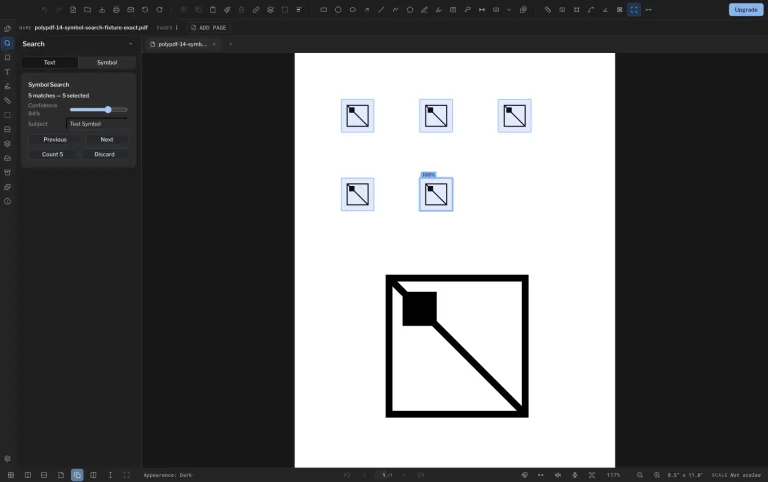
Capture a symbol from the sheet, let PolyPDF find visual matches, review the results, and commit the accepted set as a count series.
Symbol Search is a PolyPDF Pro workflow. Capture one example, review every candidate, and commit the accepted matches as one linked Count series.
Free with no trial timer: markup, review, calibration, 3 hand-created measurements per document, and Revision Package viewing. Symbol Search, plugins, and Revision Package changes or publishing require Pro.
Quick answer
How do you count repeated symbols in a construction PDF?
In PolyPDF Pro on Mac or Windows, capture one clean symbol, search the selected pages, review every candidate, and commit accepted matches as a linked Count series. Check the drawing scope and keep different fixture types in separate worksheet subjects. Symbol Search matches graphics, not text characters. Free opens drawings for review but does not run Symbol Search.
Check the fixture-count exercise →01 / WHY
Auto-count is fastest when the human stays in control.
Drawing symbols vary with scan quality, line weight, rotation, and nearby geometry. PolyPDF treats Symbol Search as a reviewable workflow: you choose the example, inspect the candidate matches, and commit the results you are prepared to use.
Work with the construction drawing set
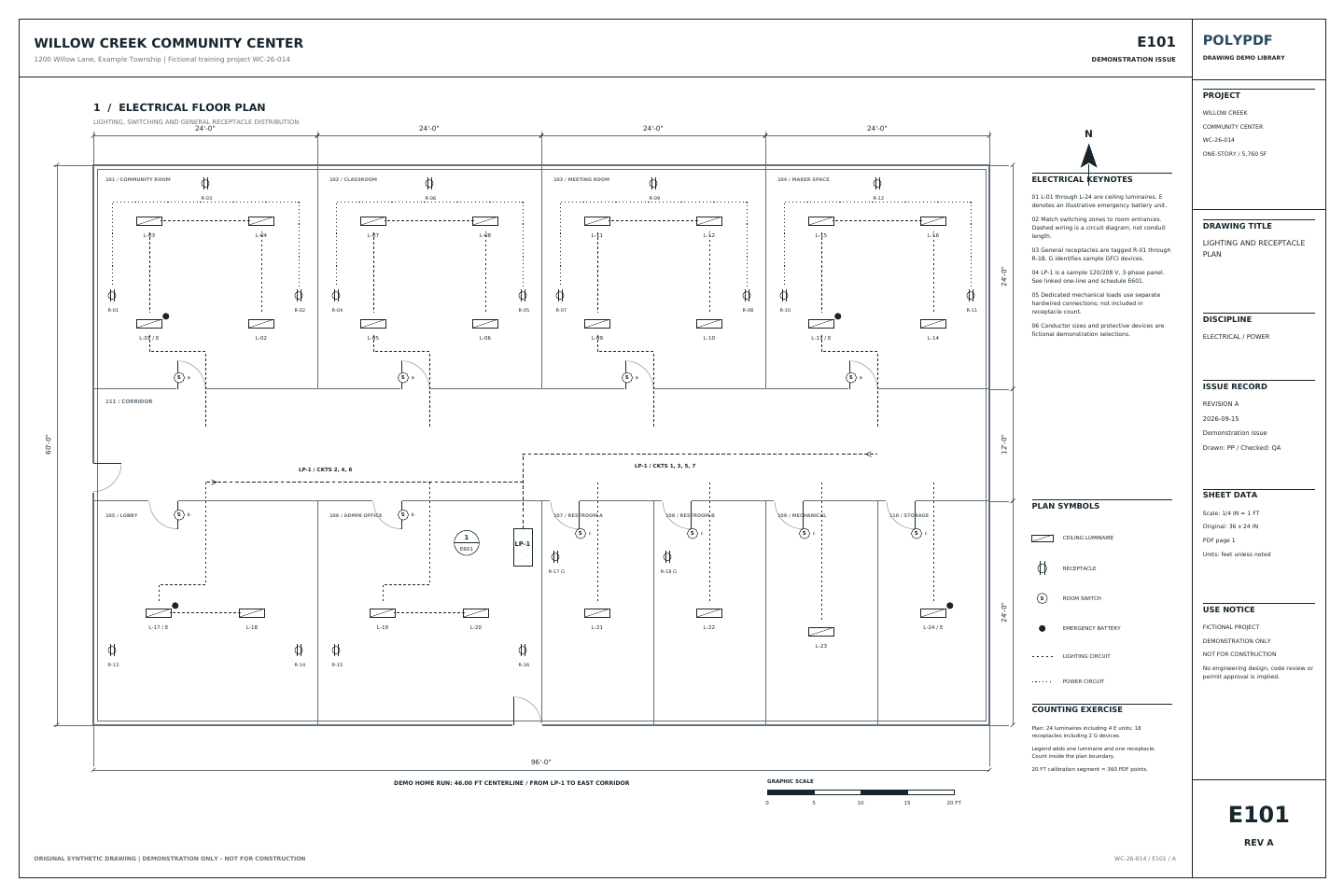
Count the Willow Creek lighting plan
E101 · E601
- Open E101 and identify the luminaire symbol in the legend. Count only the plan, excluding legend and detail examples.
- Review 24 plan luminaires, including 4 emergency luminaires. The emergency subset is included in 24, not added to it.
- Calibrate the 20 ft reference. Trace the LP-1 / CKTS 1, 3, 5, 7 diagram from the panel, then north and east: 8 + 38 = 46 ft.
The dashed wiring is a circuit diagram, not a conduit takeoff. Pro is required for Symbol Search; review every candidate. The 24 fixtures and 46 ft are drawing references, not app results.
Drawing reference values, not new app test results. Work on a copy and check your own saved output.
Reconcile fixtures and receptacles with the electrical review sheet →
 Download the example drawing · PDF
Choose the counting workflow
Inspect the drawing in Free. Run Symbol Search with Pro.
Free opens the practice PDF for review, markup, and calibration, with up to 3 hand-created measurements per document. It does not run Symbol Search. Activate Pro to capture a symbol, review matching candidates, and commit the accepted count series.
Use Symbol Search for repeated construction graphics such as fixtures, outlets, or diffusers. Use text search or OCR when you need words and labels. A symbol count is not a word count, a circuit design, or a priced estimate.
Personal Pro: $74.95 USD, one payment. Use PolyPDF 1.x forever on up to 3 Mac or Windows computers. Every PolyPDF 1.x update is included. Future major versions may be optional paid upgrades.
Start with a file you can inspect.
Download the free app to check whether your drawings open and review correctly. The automatic counting exercise below requires Pro; downloading the app does not unlock Symbol Search.
Free with no trial timer: markup, review, calibration, 3 hand-created measurements per document, and Revision Package viewing. Symbol Search, plugins, and Revision Package changes or publishing require Pro.
Review the scope before accepting a total
Check two fixture types on E-101.
The separate E-101, Revision A practice sheet contains 8 Type A fixtures and 4 Type B fixtures. These are reference quantities from the source drawing, not verified Symbol Search results. The historical screenshots use different demo sheets.
- Define the scope. Count only fixtures inside the plan boundary. Type A is a circle with a cross; Type B is a square. Keep the two types in separate worksheet subjects.
- Search and review with Pro. Select the current page and capture one complete Type A symbol. Inspect every candidate before choosing Count. Repeat separately for Type B; compare the reviewed totals with the reference table.
- Investigate differences. Check missed symbols, false positives, overlapping counts, and the capture box. Do not lower the confidence threshold just to force the expected total. On your own drawings, also exclude legends, schedules, and items outside your scope.
- Reconcile the handoff. Check the page markers against each worksheet subject. Clear filters when you need the full export, keep counts separate from route lengths, then save a copy and reopen it. Review the exported quantities before applying prices or labor.
| Fixture type | Visual reference | Expected count |
|---|---|---|
| Type A | Circle with cross | 8 |
| Type B | Square | 4 |
The 42 ft route in the reference CSV is a length, not another fixture quantity. Do not add it to the two count rows.
Follow the detailed Symbol Search guide → Review electrical takeoff scope →
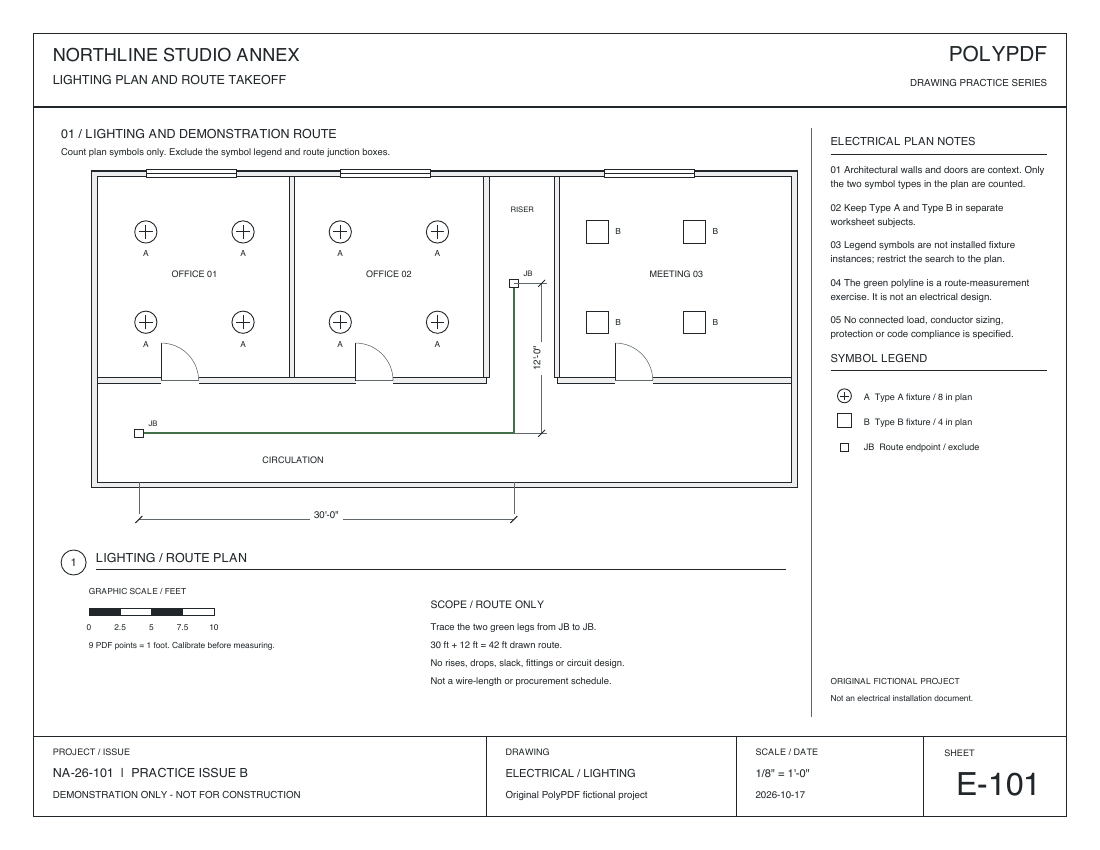
The practice drawings were redrawn on October 17, 2026 with walls, doors, dimensions, legends, and title blocks. The measured examples retain the original scale, geometry, and Mac-created annotations on the updated backgrounds. They are republished derivatives, not new desktop exports. The worksheet CSV and PDF totals come from the original October 16 test.
Count fixtures in the plan only. Exclude the legend symbols and the small JB route-endpoint boxes.
Download the reference files.
No account or email is required for these files. This synthetic drawing is for practice, not construction.
The fixture counts have not been verified by a current-release Mac or Windows Symbol Search run. The existing Mac 1.6.6 build 38 electrical output verifies only the 42 ft route. It does not prove automatic count accuracy.
02 / WORKFLOW
From source PDF to a result you can review.
- 01
Select a clean example
Draw a capture box tightly around one representative symbol and avoid unrelated labels or lines when possible.
- 02
Run Symbol Search
PolyPDF scans the PDF for visually similar regions and returns candidate matches without requiring OCR text or a CAD model.
- 03
Review the candidates
Inspect the highlighted results and adjust the selection or search threshold when the drawing contains similar-looking symbols.
- 04
Commit the count series
Turn the accepted matches into numbered count annotations that feed the takeoff worksheet and remain visible on the page.
03 / FIT
A repeatable count you can check against the drawing.
- Works from visual symbol appearance rather than relying on searchable text.
- Keeps candidate matches reviewable and adjustable before the count is committed.
- Creates numbered count markers that can be audited against the sheet.
- Feeds accepted counts into the same worksheet as lengths and areas.
- Included with PolyPDF Pro, with no separate per-search count cap.
Start with the free app. Pay once to unlock every Pro workflow.
Use PolyPDF 1.x forever on up to 3 Mac or Windows computers. Every PolyPDF 1.x update is included. Future major versions may be optional paid upgrades.
14-day money-back guarantee. Try PolyPDF on your own drawings, risk-free.
04 / FAQ
Questions before you test it.
Is Symbol Search the same as OCR?
No. OCR looks for text. Symbol Search looks for regions that resemble the symbol example you capture from the drawing.
Will it find every symbol perfectly?
Not on every drawing. Match quality depends on the source PDF, symbol consistency, rotation, scan quality, and the capture selection. Review the candidates before committing a count.
Is Symbol Search included in the free version?
No. Symbol Search is a Pro workflow in the current PolyPDF release. The same Pro license also removes the limit on hand-created measurements, unlocks installed plugins, and enables Revision Package updates and publishing.