PolyPDF 1.5.1: Interactive Stamps and Clearer Drawing Review
Quick answer
PolyPDF 1.5.1 (build 23) is available for Mac and Windows. It adds a blank-canvas interactive stamp builder, expanded symbol libraries, and Presentation Mode, plus improvements to layers, bookmarks, thumbnails, saved signature and stamp appearances, startup, memory use, and zoom. New metric dimensions default to millimetres.
This update focuses on the details of daily drawing review: prepare a repeatable stamp, find the right symbol, present a sheet, and keep the saved result looking as intended.
- Release review
- Aligned with PolyPDF 1.5.1 (build 23) on .
- Walkthrough verified
- Tested with
- PolyPDF 1.5.1 (build 23); screenshots from the signed macOS release
- Platforms
- macOS 14 or later, Apple silicon and Intel; Windows 10 or 11, x64
A stamp you can reuse, with details you can change
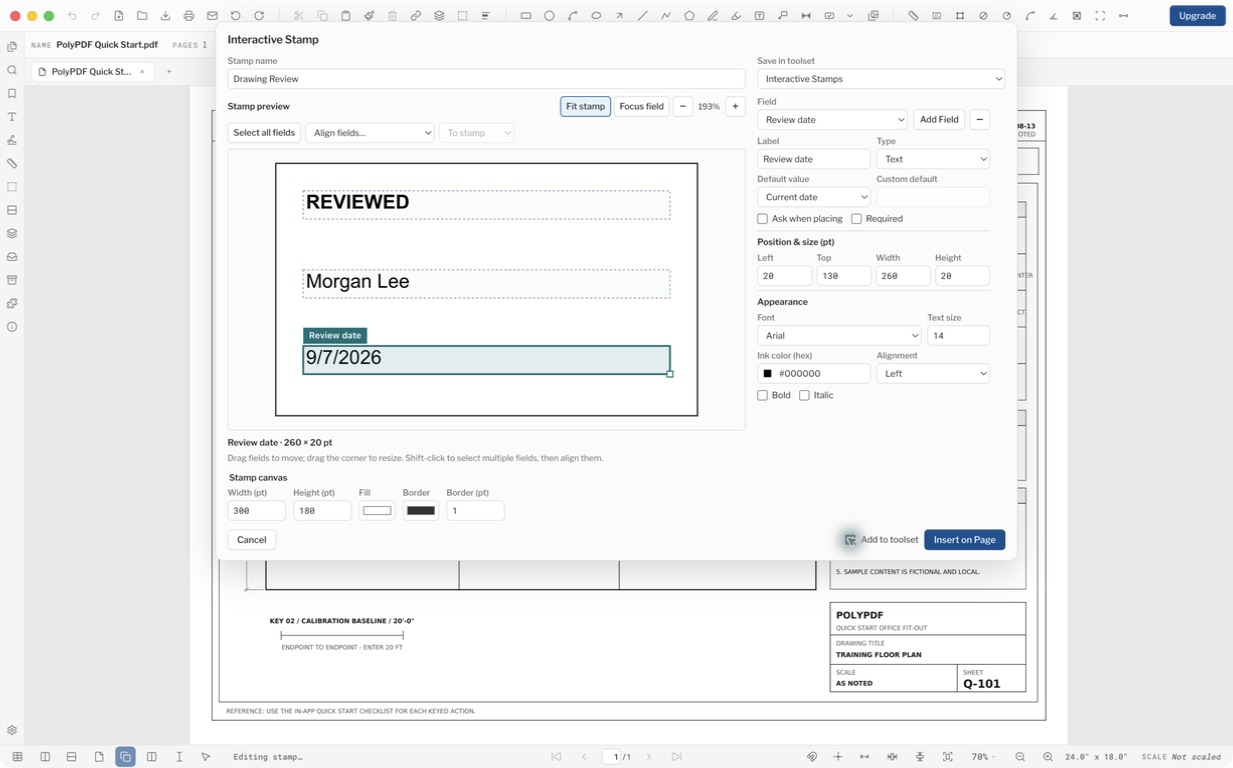
Open the arrow beside Stamp and choose Create Interactive Stamp… Start with an empty canvas, add and style fields, then choose a fixed value, an automatic value, or a prompt for each placement. A new stamp starts independently of the PDF page.
Add to toolset starts unchecked for a one-off stamp. Check it and choose a destination when the layout should become a reusable tool. Insert on Page starts placement; click the drawing, enter the requested details, and choose Place Stamp.
More symbols in the Tools sidebar
The Architectural, Landscape, Windows, and Fire Protection libraries have expanded. Open Tools, expand a library, or use Search tools to find the item you need. Place it on the drawing and check its size, orientation, and meaning against the project legend.
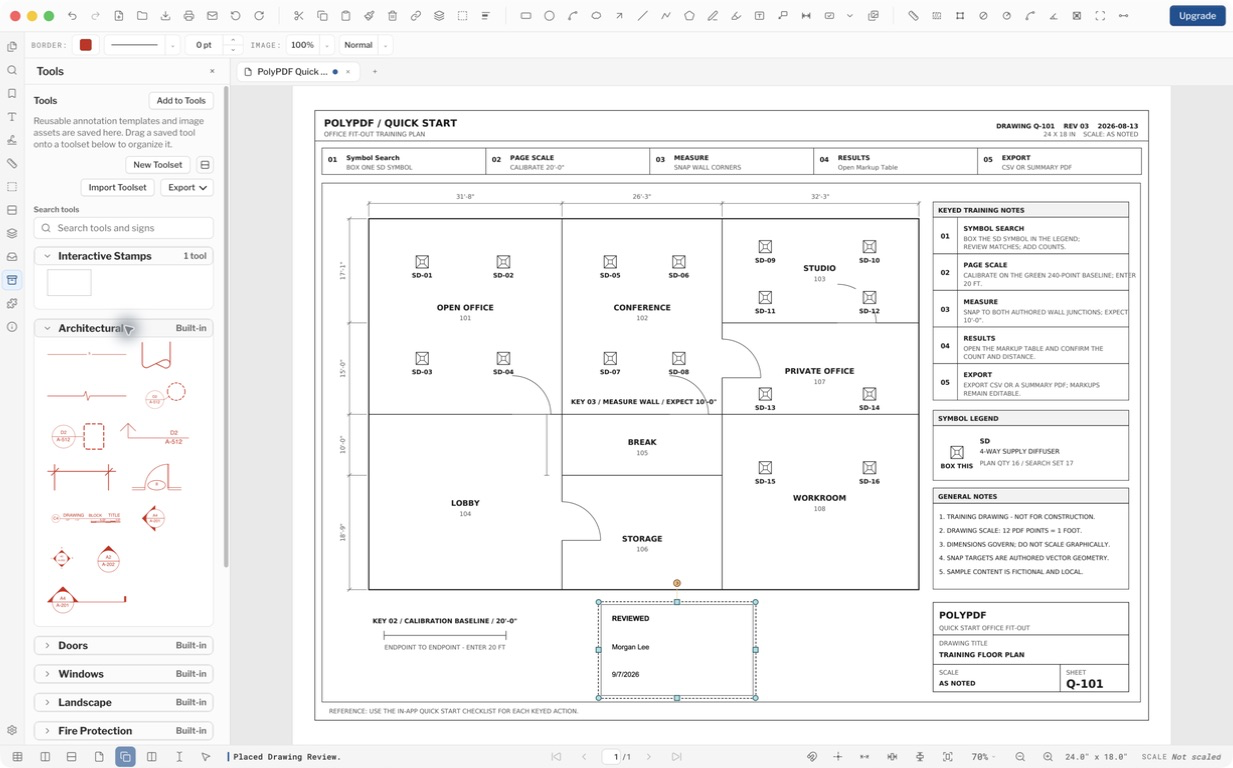
Built-in symbol libraries are available through Tools. They are separate from Symbol Search, which finds matching instances already on a drawing, and from plugins that generate content.
Present the current PDF
- Open the PDF and select the page you want to start from.
- Choose View > Presentation Mode.
- Use the arrow keys or Page Up and Page Down to move between pages. Space advances; Shift-Space goes back.
- Press Escape or choose Exit Presentation to return to the regular workspace.
Presentation Mode gives the focused PDF a clean viewing area and page navigation. It does not create a PowerPoint deck or start a shared collaboration session.
More reliable everyday review
- PDF layers, bookmarks, thumbnail navigation, rotated dimension labels, and saved signature and stamp appearances are more reliable.
- Startup, zoom, annotation interactions, and memory use across open documents are improved. Dialogs and footer controls are clearer, and new metric dimensions default to millimetres.
For metric drawings, new linear dimensions start in millimetres. Existing documents keep their explicit formats; metric area and volume still use square and cubic metres. Check Measurements > Formatting when a project calls for another display unit, and verify the page scale against a known distance.
Save-and-reopen improvements preserve signature and stamp appearances more reliably, including PDFs edited in other applications. A visible signature mark remains distinct from a certificate-backed signature. Check both the appearance and the signature status in the saved file.
Get the update on Mac or Windows
On Mac, choose Help > Check for Updates and follow the update prompt. On Windows, updates download in the background and install when you quit. You can also download the current installer from this site. Save your work before installing an update.
Both platforms ship version 1.5.1, build 23. The Mac app is signed and notarized for Apple silicon and Intel; the Windows x64 installer is Authenticode-signed. Updates from 1.5.0 were verified on both platforms, and existing Pro licenses continue to apply.
Revision Packages introduced in 1.5 remain available. Viewing and navigation are included in Free; creating, updating, and publishing packages require Pro. Collaboration remains a separate beta with its own customer-owned host.
Frequently asked questions
Is PolyPDF 1.5.1 available on both platforms?
Yes. Version 1.5.1, build 23, is published for macOS 14 or later on Apple silicon and Intel, and for Windows 10 or 11 on x64 computers.
Will an update remove my Pro license?
Your existing PolyPDF 1.x Pro license continues to apply. The release was checked through real 1.5.0 to 1.5.1 update flows on Mac and Windows.
Does the metric default change older drawings?
The new default affects new metric dimensions. Explicit formats already saved in documents are preserved, and page calibration still needs to match the drawing.
Sources and further reading
Try this workflow on your own drawings
PolyPDF is a free download on Mac and Windows. Open your own PDFs, use the markup tools, and place up to 3 hand-created measurements per document before you decide whether to buy.
Free with no trial timer: markup, review, calibration, 3 hand-created measurements per document, and Revision Package viewing. Symbol Search, plugins, and Revision Package changes or publishing require Pro.