PolyPDF 1.5.4: Better Highlights, Arcs, and Area Cutouts
Quick answer
PolyPDF 1.5.4 (build 26) is available for Mac and Windows. Highlights keep underlying drawing details visible, filled shapes gain a Highlight control, arc handles separate radius from sweep, area cutouts can be moved and resized, and estimates scroll more reliably. Windows also removes an unnecessary file operation before opening a PDF.
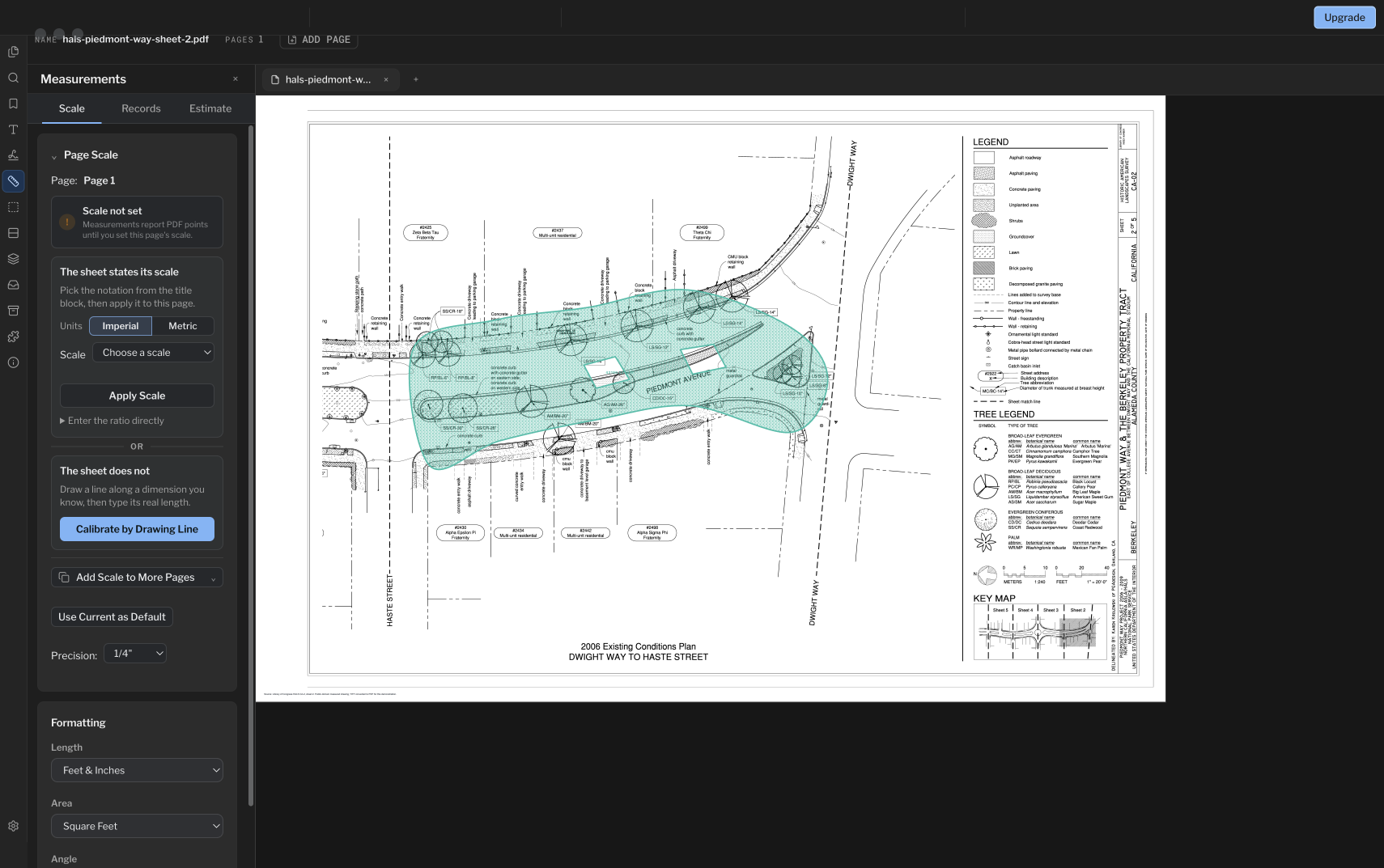
This update improves the controls used to mark up a drawing and refine its measurements, with a Windows file-opening patch and improved playback for supported interactive PDFs.
Highlights that keep the drawing readable
Highlights blend their color with the PDF so text and linework remain visible beneath them. To highlight an area with an existing filled annotation, select it and use Highlight beside Fill in the style toolbar.
This lets a filled shape mark a room, detail, or review zone while keeping the drawing underneath readable.
Arc radius and sweep have separate controls
Arc handles now follow a continuous drag. The middle handle changes the radius; the end handles change the sweep, which is how far the arc extends around its circle.
| Control being dragged | Helper dimension |
|---|---|
| Middle radius handle | Radius |
| Corner resize handle | Radius |
| End handle during a sweep adjustment | Arc length |
The helper follows the adjustment you are making, so changing the size of the circle shows its radius and extending the arc shows its length.
Move cutouts and work through estimates
Area cutout resize handles now sit on their selection frame. Drag inside a cutout to reposition the opening within the measured area. Review the boundary and resulting net area after editing.
Vertical and horizontal scrolling in the estimate workspace has also been improved. Editing a value retains your scroll position so you can continue where you were working.
Updated Windows file-opening checks
The Windows access check no longer performs an unnecessary rename before reading a PDF. This change applies when opening local files and files on shared network drives.
If a shared-drive PDF still fails to open after updating, send a fresh report through Help > Report to Support. Include the time and error message, whether the file remains visible and opens in another reader, whether a local copy works, and the server or NAS and VPN details.
Supported interactive PDFs play in the document
Supported Doom and OfficeKart PDFs play directly in the document view, with improved controls and playback. This support is specific to compatible documents; it does not imply unrestricted PDF JavaScript support.
Get 1.5.4 on Mac or Windows
- Save your work and choose Help > Check for Updates.
- Follow the update prompt. On Windows, downloaded updates install when you quit the app.
- Reopen PolyPDF and check About for version 1.5.4, build 26.
You can also use the current downloads on this site. The Mac app is signed and notarized for macOS 14 or later on Apple silicon and Intel. The Windows installer is Authenticode-signed for Windows 10 or 11, x64.
The update is included with existing PolyPDF 1.x licenses. PolyPDF Pro remains $74.95 USD once for up to three Mac or Windows computers; existing paid licenses retain their purchased rights.
Frequently asked questions
Is 1.5.4 available for both Mac and Windows?
Yes. Both platforms ship PolyPDF 1.5.4, build 26. The shared-drive file-opening check change applies to Windows; the markup and measurement improvements ship on both platforms.
How do I turn a filled shape into a highlight?
Select the filled annotation and use Highlight beside Fill in the style toolbar. The color blends with the drawing so the underlying text and linework stay visible.
Does the update cost extra?
No. Every public PolyPDF 1.x update is included with a PolyPDF 1.x license. Your existing paid license keeps its purchased rights.
Sources and further reading
Try this workflow on your own drawings
PolyPDF is a free download on Mac and Windows. Open your own PDFs, use the markup tools, and place up to 3 hand-created measurements per document before you decide whether to buy.
Free with no trial timer: markup, review, calibration, 3 hand-created measurements per document, and Revision Package viewing. Symbol Search, plugins, and Revision Package changes or publishing require Pro.