How to Prepare an Issued PDF Set
Quick answer
To prepare an issued PDF set, preserve the source files, define a manifest and naming rule, distinguish navigation page labels from visible Bates identifiers, then add headers, footers, watermarks, and Bates numbers to each working document. PolyPDF 1.3.4 does not expose a cross-file Batch Process, so continue any Bates sequence by recording the verified last number and setting the next document’s start value manually. Run Accessibility & Preflight, inspect every output in a recipient-style viewer, and sign only after page-content changes are finished.
An issued set should tell a recipient what each page is, which issue it belongs to, and whether the file survived production intact. That takes a controlled sequence, not one large button press.
- Last verified
- Tested with
- PolyPDF 1.3.4 (build 16)
- Platforms
- macOS and Windows
Start with an issue manifest and untouched sources
Before changing a PDF, record the expected files, order, issue status, page counts, and output names. Copy the sources into a working location and reserve a separate output folder. This makes a missing volume or unexpected page-count change visible before distribution.
- Keep source, working, and issued files in distinct folders.
- Decide whether the issue identifier belongs in the filename, a visible header or footer, a Bates sequence, or more than one of those places.
- Record whether bookmarks, links, forms, attachments, layers, or signatures must survive.
- Do not modify an already signed PDF to make a new issue. Obtain an authorized unsigned source or follow the issuer’s re-signing process.
A backup is part of the workflow, not a recovery plan added after something goes wrong. Whole-document operations can affect every selected page.
Page labels, printed page numbers, and Bates numbers are not interchangeable
| Identifier | Where it lives | Best use |
|---|---|---|
| PDF page label | Viewer navigation metadata | Names such as A-101 or iv in the page control |
| Header or footer page number | Visible page content | Human-readable numbering on printed and viewed pages |
| Bates number | Visible sequential identifier | A controlled cross-file sequence for issue or discovery tracking |
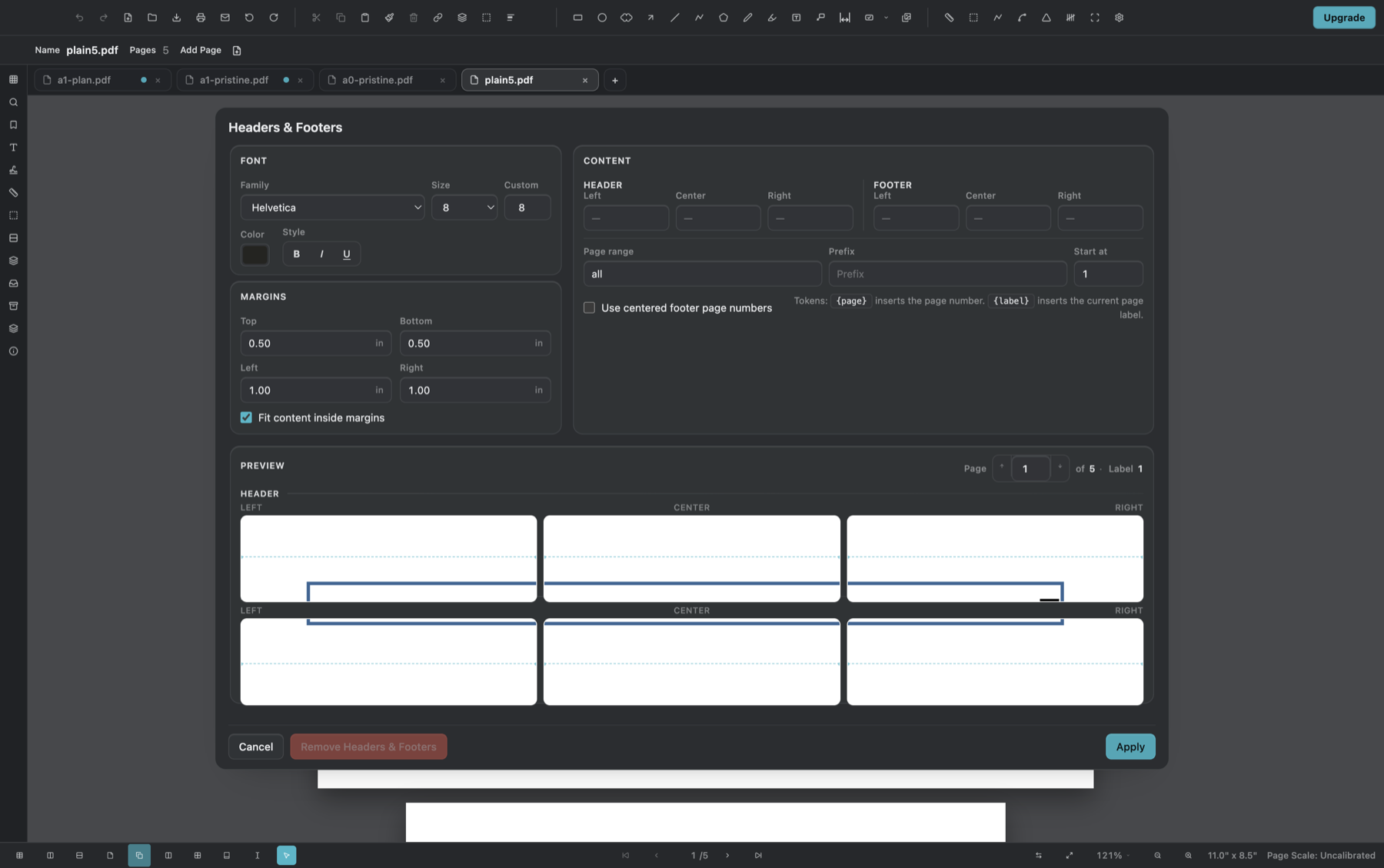
A page label can help a viewer navigate to A-101 without changing the printed sheet. PolyPDF’s Headers & Footers fields support {page} for the physical page position and {label} for the existing page label. A Bates identifier is a separate visible sequence with a prefix, start number, digit count, suffix, placement, and styling.
Choose one authoritative scheme for each purpose. Printing a page label in the footer can be useful, but it does not turn that label into a cross-volume Bates sequence. Conversely, Bates numbering does not repair incorrect drawing-sheet labels or bookmarks.
Set headers and footers before other page-content operations
Open Document › Headers & Footers for each file that needs issue text. Build 16 provides six positions, a page range, font and margin controls, and a preview. Use {page} or {label} exactly as documented; there is no {total} token, so an unsupported token can print literally.
- Use the page stepper in the preview to inspect sheets with different sizes, rotations, or title-block positions.
- Keep issue text outside drawing and title-block content, and check the chosen margins on the smallest page.
- Apply headers and footers before certificate signing because they change page content.
- If the result is wrong, use the dialog’s Remove Headers & Footers action on the working copy rather than covering the text with another object.
Apply Bates numbers and watermarks document by document
PolyPDF 1.3.4 does not expose the former cross-file Batch Process in the user interface. Apply Bates numbering and any text watermark to one working document at a time, save a new output, verify it, and only then calculate the starting number for the next file. This slower sequence keeps the public workflow aligned with the commands users can actually open.
- Open the first working PDF in manifest order and confirm its page count and intended page range.
- Open Bates Numbering and set the prefix, starting number, digit count, suffix, placement, page range, and styling required by the issue rule.
- Apply the number, save to the clean output folder under the manifest name, close it, and reopen the saved copy.
- Verify the first and last Bates value. Record the last verified number rather than relying only on the expected page count.
- Open the next working document and use the recorded last value plus one as its start. Repeat until every volume is accounted for.
- When a text watermark is required, apply it per document with the available placement, opacity, rotation, font-size, color, and layer controls. Build 16 does not add a logo-image watermark.
- Compare the completed output folder against the manifest before preflight and signing.
expected next number = starting number + successfully numbered pages
There is no user-facing cross-file Batch Process in build 16. If you need unattended multi-file production, use an organization-approved external workflow rather than documenting a PolyPDF command that is not exposed.
Preflight and verify in the order a recipient will encounter the set
Run Document › Accessibility & Preflight on each final candidate. Build 16 reports 10 automated checks across five groups. It is a screening tool, not PDF/UA certification or a substitute for visual and contractual review.
- Open every output from the clean issue folder and confirm filename, page count, first page, and last page.
- Spot-check page labels, bookmarks, links, rotation, layers, forms, and attachments that should remain.
- Check the first and last Bates number in every file and the transition between files.
- Inspect headers, footers, and watermarks on portrait, landscape, and rotated sheets.
- Search for the issue identifier and print or export representative pages.
- Open the exact release files in a second viewer that resembles the recipient’s environment.
- Apply any required certificate signature only after these page-content checks, then verify the signed file without modifying it.
Worked use case: three-volume review issue
Consider an illustrative three-volume set containing 28, 31, and 15 pages. The issue manifest calls for “REVIEW” in the header, a centered text watermark, and Bates identifiers beginning at REV-000101. First, add and verify the header on each working file. Number the first volume REV-000101 through REV-000128, set the second to start at REV-000129, and set the third to start at REV-000160. Apply and inspect the watermark on each document separately.
If all 74 pages are numbered, the next unused value should be REV-000175. That arithmetic does not prove the result: verify the first and last value in each volume and the boundaries between volumes. Run preflight, confirm recipient-viewer appearance, then sign if the issue procedure requires it.
Frequently asked questions
What is the difference between a PDF page label and a Bates number?
A page label is navigation metadata a viewer can display, such as A-101. A Bates number is a visible sequential identifier applied for controlled tracking. One does not automatically replace the other.
Can PolyPDF 1.3.4 process the whole issued set as a cross-file batch?
No user-facing Batch Process is exposed in build 16. Apply headers, footers, Bates numbers, and watermarks to each document, save separate outputs, and verify the sequence against the manifest.
How do I continue Bates numbering across several PDF files?
Verify the last number in the reopened output for one file, add one, and enter that value as the next file’s starting number. Record every boundary in the issue manifest.
Should I add a digital signature before or after numbering and watermarks?
After. Headers, footers, Bates numbers, and watermarks change page content and may be blocked by or invalidate a signature. Finish and verify page-content operations before signing.
Sources and further reading
- Library of Congress: PDF 2.0, ISO 32000-2
- PolyPDF 1.3.4 build 16 document-production verification — Headers, footers, Bates numbering, watermark, and the 10-check preflight behavior were verified with owned fixtures on August 18, 2026; cross-file Batch Process is not exposed.
Practice the issue sequence before the deadline
Download PolyPDF for macOS or Windows and run a representative copy through per-document headers, numbering, watermarks, preflight, and recipient-viewer checks before producing the live issue.
Free with no trial timer. Hand-created measurements are capped at 3 per document.