Digital vs Visual PDF Signatures vs Professional Seals
Quick answer
A certificate-backed PDF signature uses a Digital ID and CMS data to let a verifier test whether the signed PDF byte ranges still match; that establishes integrity, while identity trust remains a separate certificate and policy decision. A visual signature in PolyPDF is only a page mark and provides no cryptographic proof. The Professional Seal Maker plugin creates editable drafting artwork, not a cryptographic signature, and the licensed professional remains responsible for checking board rules and permitted use.
A signature appearance, a cryptographic signature, and a professional seal can look related on a drawing, but they answer different questions. Confusing them can leave a polished page with no verifiable integrity—or a valid signature attached to an untrusted identity.
- Last verified
- Tested with
- PolyPDF 1.3.4 (build 16)
- Platforms
- macOS and Windows
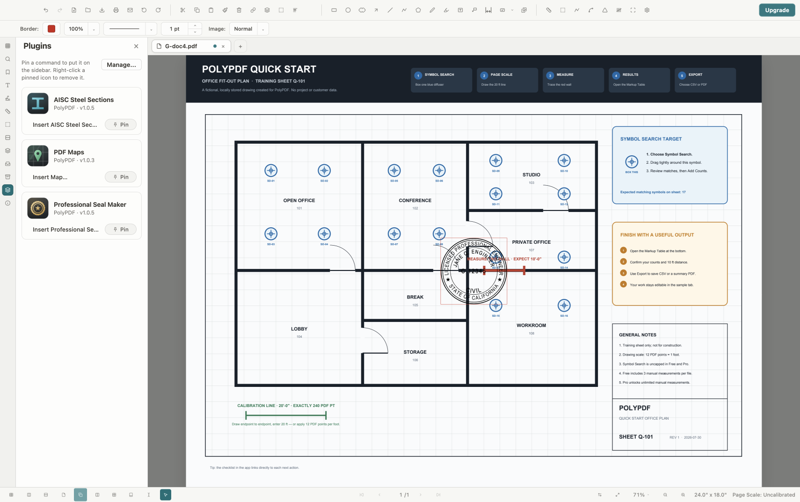
Three marks, three different claims
| Option | What it provides | What it does not prove |
|---|---|---|
| Certificate-backed signature | Cryptographic integrity check over signed PDF byte ranges | Automatic trust in the signer, authority, or legal effect |
| Visual signature | A visible name or drawn/saved signature appearance | Cryptographic integrity or certificate identity |
| Professional seal graphic | Jurisdiction-specific drafting artwork generated from entered details | A cryptographic signature, board approval, or permission to seal the document |
Choose based on what the recipient must verify. A visual appearance may satisfy a presentation requirement. To detect whether protected bytes changed, use a certificate-backed signature. When a professional seal is required, review its artwork under the applicable board’s rules, then sign separately if cryptographic integrity is also required.
This guide explains product behavior, not whether a mark satisfies a contract, statute, licensing board, or court. Confirm those requirements with the responsible authority.
Certificate signatures: integrity first, trust second
PolyPDF uses a Digital ID to create a CMS signature over defined PDF byte ranges. A verifier recalculates the digest and compares it with the signed data. If the bytes no longer match, integrity fails. This differs from inspecting a checkmark or signer name drawn on the page.
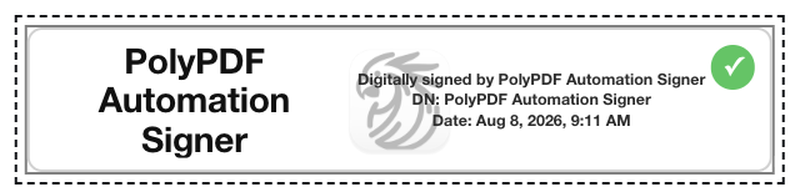
Integrity and trust are separate. A mathematically valid signature can use a self-signed, expired, unknown, or untrusted certificate. A recipient’s decision can depend on trust anchors, the certificate chain, policy, signing authority, and available time or revocation evidence. A valid cryptographic result is not a universal identity endorsement.
Visual signatures: useful appearance, no cryptographic proof
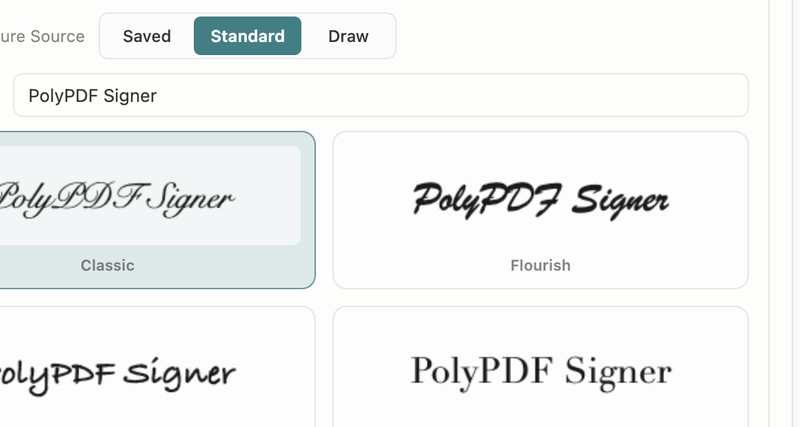
Visual mode can place a saved signature, a standard style, or a drawn mark. That may suit an internal approval or a process where another system records identity and consent. It does not create a CMS signature and cannot tell a later viewer whether page bytes changed.
- Do not describe a visual mark as digitally signed merely because it looks like handwriting or includes a date.
- A screenshot of a visual signature is not stronger evidence than the mark itself.
- If integrity matters, pair the final visual layout with a certificate-backed signing step or the organization’s approved signing platform.
- Legal effect depends on context and governing rules; cryptographic capability alone does not decide enforceability.
Professional seals: controlled artwork with professional responsibility
The Professional Seal Maker asks for a profession, jurisdiction, and template fields, then inserts an image-stamp annotation. It is a drafting aid. The seal has no certificate signature and does not prove who placed it, current licensure, or whether that jurisdiction permits the specific use.
- Compare spelling, license number, profession, jurisdiction, and any dates against the professional’s authoritative records.
- Check current licensing-board rules for appearance, size, wording, electronic sealing, responsible control, and permitted documents.
- Keep the seal editable while drafting, then finish all page-content changes before certificate signing.
- Treat any handoff from the plugin to the Digital ID workflow as a separate operation: the signature may protect the finished bytes, but it does not retroactively certify the template’s legal compliance.
A seal graphic can be visually accurate and still be used improperly. The licensed professional whose identity appears on it is responsible for the decision to apply and issue it.
Worked use case: seal and sign a final drawing issue
- Start with an authorized unsigned working copy and complete revisions, markups, page operations, headers, watermarks, and sanitation first.
- Generate the professional seal artwork, compare every field and its appearance with the applicable board requirements, and place it on the page.
- Have the responsible professional review the entire final document, not only the seal area.
- Open the Signatures panel, import or select the professional’s approved Digital ID, then use Apply Signature in certificate mode and place the signature appearance.
- Save the signed output under the issue filename, close it, reopen it, and inspect the Signatures panel for the integrity result and certificate details.
- Send the exact saved file without further page-content edits. Ask the recipient to validate it in their own PDF viewer and under their trust policy.
This sequence keeps the roles clear: the seal communicates a professional designation, the professional supports the issue decision, and the certificate signature protects signed byte ranges. None substitutes for another.
Read validation failures literally and stop editing after signing
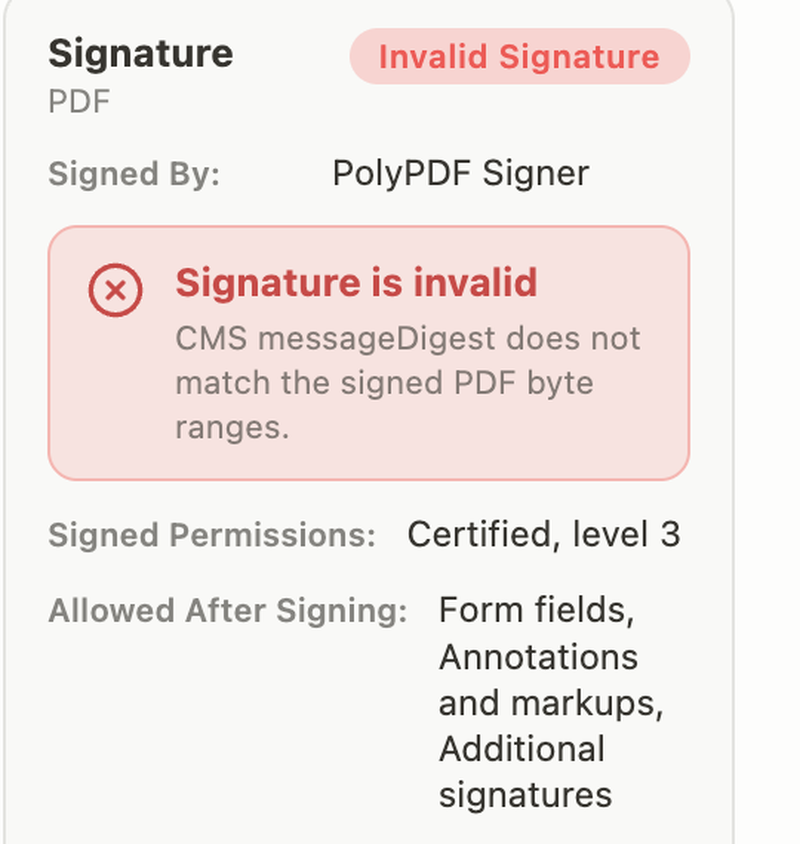
A failed digest comparison means the cryptographically checked content does not match what was signed. Do not cover the warning, replace the appearance, or send the document as though it were valid. Return to the authorized unsigned source, determine whether the change was expected, complete the new issue, and sign again with the proper identity.
- Finish content editing before signing. Some certified signatures allow limited later actions, but page-content changes may be blocked or invalidate the signature.
- Verify the reopened saved file, not only the document still open after signing.
- Review both integrity status and certificate trust; “valid bytes” and “trusted signer” are different conclusions.
- Preserve the signed original. Do not use a print-to-PDF or image export as a replacement when verifiable signature data must survive.
Frequently asked questions
Is a visual signature in PolyPDF a digital signature?
No. Visual mode places an appearance on the page but does not create a certificate-backed CMS signature or a cryptographic integrity check.
Does a valid PDF signature prove the signer is trusted?
Not by itself. Validity can show that signed byte ranges match. Trust in the certificate and signer depends on the certificate chain, trust anchors, policy, authority, and other verification context.
Is a PolyPDF professional seal a cryptographic signature?
No. The plugin generates seal artwork as an image stamp. Use a separate Digital ID signing workflow when cryptographic integrity is required.
Can I edit a PDF after applying a certificate signature?
Some signatures permit limited later actions, but page-content edits can be blocked or invalidate the signature. The reliable workflow is to finish and verify the document before signing.
Sources and further reading
- NIST Computer Security Resource Center: Digital Signature glossary
- RFC 5652: Cryptographic Message Syntax
- PolyPDF: Introducing PolyPDF Plugins
- PolyPDF 1.3.4 build 16 signature and seal verification — Verified with controlled identities and owned fixtures on August 18, 2026.
Practice the distinction on a controlled file
Download PolyPDF for macOS or Windows, compare visual and certificate modes on a disposable fixture, and inspect both valid and invalid results before adopting an issue workflow.
Free with no trial timer. Hand-created measurements are capped at 3 per document.